
Conditions and attractors
What for
Section titled “What for”So that each panel, fin or rib is different on purpose: larger near an entrance, open towards the sun, closed above a certain floor.
Attractors
Section titled “Attractors”An Attractor gives each element a value according to how close it is to some points or curves.
- near: the value right next to the attractor (for example,
90degrees). - far: the value at the reach or beyond (for example,
0). - reach: how far the effect goes, in metres. Empty: up to the farthest element.
- attractors: one or more points, or curves: a path, a riverbank, the edge of a square.
- several: with several attractors, either the closest one rules or their effects add up.
- curve: how it goes from near to far: linear, smooth, accelerating or slowing down.
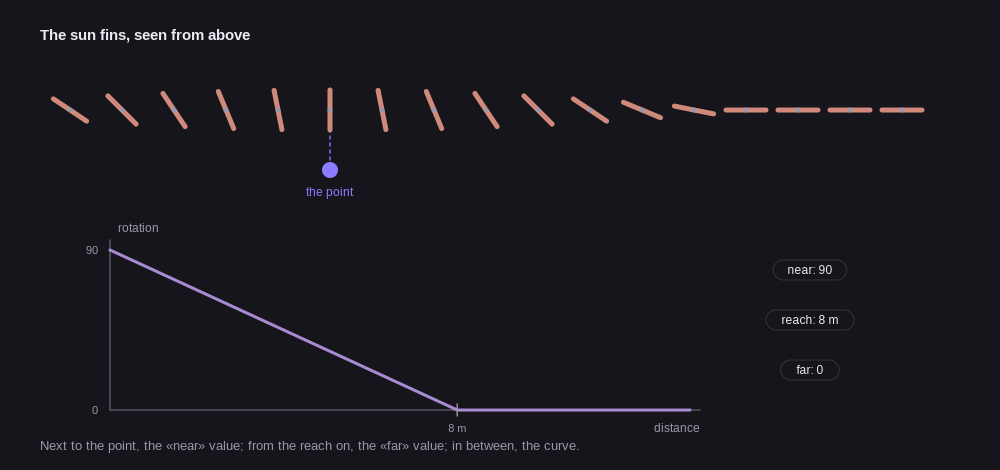
Connect what comes out to whatever you want to vary: the rotation of a Place, the factor of a Scale, the distance in a Move.
Tip: to see what the Attractor does inside, build the same thing by hand once: a Distance from each element to the point, and a Remap from that distance to the range you want, with limit on.
Conditions
Section titled “Conditions”- Choose gives one result per element, one thing or the other: an open panel or a closed one.
- Filter keeps only the elements that pass, and leaves the others out. With remove: yes, the ones that stay are numbered again (0, 1, 2…); with no, the others stay in their place, empty.
- Compare gives a yes or no per element: a is less than, greater than, equal to or different from b. Combine conditions joins two with and or or, or turns one around with not.
Formulas in your language
Section titled “Formulas in your language”A Formula works like a spreadsheet cell, and it understands Spanish and English, even mixed:
si(a < 7; 3; a < 16; 4,5; 6)is the same asif(a < 7, 3, a < 16, 4.5, 6).y,o,noorand,or,not.- Spaces do not matter:
a/2anda / 2are the same.